
OCDify: private AI,
practical file organization.
A Meld Origins product for Mac that reads documents locally, organizes them into categories and records changes so they can be undone. This case study looks at the visible product decisions behind that workflow.
Explore OCDifyBy Sourish Sarmah · . Studio-owned product work, not a client engagement. Sourish is credited on the OCDify product team.
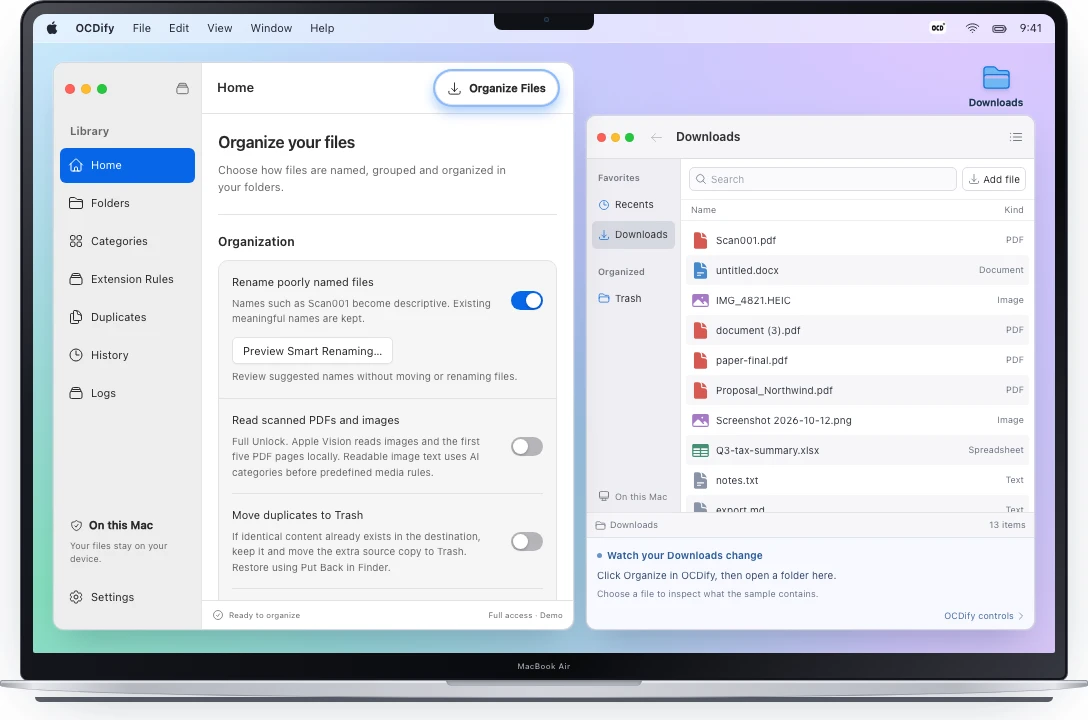
A folder full of files.
A decision for each one.
A Downloads folder mixes invoices, reports, notes and other documents. File extensions tell you the format, but often say little about what a document is for. Unclear filenames add another decision before a file can be put away.
OCDify’s public workflow starts with folders and categories chosen by the user. It uses a language model on the Mac to read a file’s name and a sample of its text, select a category and help produce a clearer name. The app then carries out the file operation.
The product has to make three things understandable: where analysis happens, which files it may touch and how a person can recover from an unwanted change. These concerns shape the interface as well as the AI behavior.
AI capability with
visible user controls.
Keep analysis on the Mac
The public privacy guide documents local inference with llama.cpp. File contents, names, folder paths and rename suggestions are not uploaded for analysis. The model downloads during setup; App Store services use the network separately. Local processing is a clear product boundary, not a claim that the app never needs the internet.
Let the user define the filing system
Users select folders through macOS and name their own categories. The app can file into existing destinations, while folder watching handles new top-level files in the selected folders. Existing subfolders are left untouched unless selected separately.
Make changes recoverable
Seven-day History records organization changes. A person can undo a move, a rename or both, individually or for a selection of files. The published behavior includes collision protection: undo refuses to replace an existing file.
Show the product before requiring setup
The website provides an interactive preview with fictional documents and a Finder view that reflects the same sample changes. This lets a visitor explore categories, watching and undo before downloading a local model. The preview is explicitly distinguished from the Mac app’s local inference.
From a document
to a recorded change.
This flow summarizes the behavior described in OCDify’s public guides. It is not a disclosure of the private implementation.
Choose the scope
Select a folder and define categories. macOS mediates access to the chosen folder; the product does not treat every file on the machine as eligible.
Read and categorize locally
The local model uses the filename and sampled document text to select a category. Smart Rename can suggest a more descriptive name. Unsupported or unreadable files may be skipped.
Apply and record the change
The app moves the file to its destination and records the operation in History. Folder watching extends the workflow to new files arriving in selected folders.
Review and recover
Inspect the result, pause automatic organization if needed, and undo recorded moves or names within the available history. Recovery depends on the file still being at its recorded location.
The limits are part
of the product.
Local AI changes the privacy boundary, but it does not remove hardware, setup or recovery constraints. OCDify publishes these requirements so users can judge whether the product fits their Mac and their files.
Setup and hardware
OCDify requires Apple Silicon and macOS 14 or later. The initial model download is approximately 2.4 GB, with at least 3 GB of free space recommended. Core organization works offline after setup.
Supported files and OCR
Content analysis depends on readable document text. Full Unlock adds on-device OCR through Apple Vision for supported images and scanned PDFs, up to the first five PDF pages. Protected or unreadable documents can still be skipped.
History and duplicate review
Undo covers seven days and requires the file to remain at its recorded location. Exact duplicate review compares file contents locally and waits for confirmation before selected copies go to Trash. These are separate recovery and cleanup controls, not a promise that every possible file change can be reversed.
A shipped product
you can inspect.
OCDify is available through the Mac App Store. Its public site includes setup instructions, feature guides, a privacy explanation and an interactive preview. The free tier supports one selected folder, up to four categories, automatic sorting and seven-day undo. An optional one-time Full Unlock expands the available features.
The observable result is a released Mac app, a usable free tier and product guides that explain setup, privacy and recovery. A visitor can inspect the workflow through the public preview before downloading the app and model.
For a team building an AI-enabled product, the relevant lesson is to design the controls around the capability: define the data boundary, make the scope visible, explain exceptions and provide a recovery path. Those questions also apply to agents that act through business APIs.
Explore software product development Explore AI agent implementationPublic product
evidence.
Product behavior checked against the publisher’s public pages on 10 November 2026. The product guides remain the source for current features and requirements.